Common FAQs
-
What are features of this platform?
Earthbook, name of this website, is a 4D platform operated through browsers. You can upload and display UAV’s aerial photos, 3D models then share to others through earthbook’s APIs.
-
What functions are provided in earthbook?
It provides:
1. post wall- It lists yours and others public work.
2. data warehouse- You can choose multi type data from the warehouse and show it on 3D map.
3. release post- You can release your work on post wall.
4. studio- It provides screenshot, screen recording and multi time-stage images comparison
5. measure- It provides distance and area calculators.
6. plot- You can add line, circle, rectangle, polygon and POI on 3D map
7. basic setting- You can adjust base map, digital terrain model, vertical exaggeration, fog, coordination system and display features here.
8. upload- You can upload your aerial photos, orthographs and 3D models to your cloud space. -
Does this platform need GIS background?
You don’t need GIS background to use earthbook. It provides a place to show uav’s work. Moreover, you can visit others work through post wall to enhance your skills.
-
How to contact if I have problems about earthbook?
You can contact us by email (service@earthbook.xyz),
call (03-6578062) or fax (03-6577225).
We appreciate your feedbacks.
Registered Member
-
Is it free for registration?
Yes, there is no extra fee for becoming a member. However, you can pay for enlarging cloud space and some special functions.
-
Where I can register?
In home page, you can choose Facebook account or Google account to login. You can fill your email address, name and password to register alternatively.
Using Problems
-
Basic Setting
There are some functions can be adjusted in setting tab, including base map, 3D terrain, coordination system and so on. In base map function, there are several types of images you can choose like satellite images or street maps. In 3D terrain function, there are three different resolution models can be selected, ellipsoid, Cesium world terrain and Taiwan 20m DTM provided by MOI. You can adjust vertical exaggeration by selected last two DTMs. This platform also provides some effects to help you generate a vivid earth like coordinate grid, sun lighting, terrain, water ripple and cloud. Showing metadata of *.shp file is possible, if you turn on the” Layer information” function.
-
Data Warehouse
Users can choose interested files to be imbedded on the map as an integration data, including 3D models, 2D layers and user’s photos or videos took by UAV. 2D layers took in same area but at different time can be compared as a time-lapse GIF picture (for more than two photos) or a swipeable screen (for two photos), which is shown in studio function.
-
Release Post
Users can release integration data and description for it on the post wall. Privacy level for posts can be set as public, privacy or shared between cooperation. In the post, we provide several ways to share it including direct web address, posted to facebook and imbedded-available iframe code to website.
-
Studio
Users can print screen or take short video to demonstrate an integration data. Moreover, time-lapse GIF picture (for more than two photos) or a swipeable screen result (for two photos) can be generated when users select them in data warehouse function.
-
Measurement tools
We provide basic measurement tools for users including ruler and area calculator.
-
Plot
Users can plot points, lines and polygons on the map, which are adjustable with their color, transparency, locations and can be added with hyperlinks or pictures. These make maps are easier to read.
Flying Missions
-
File Upload Considerations
Video:The supported file formats are .mp4 and .mov.( SRT is required )
Flight path:Accept only csv file
CSV Example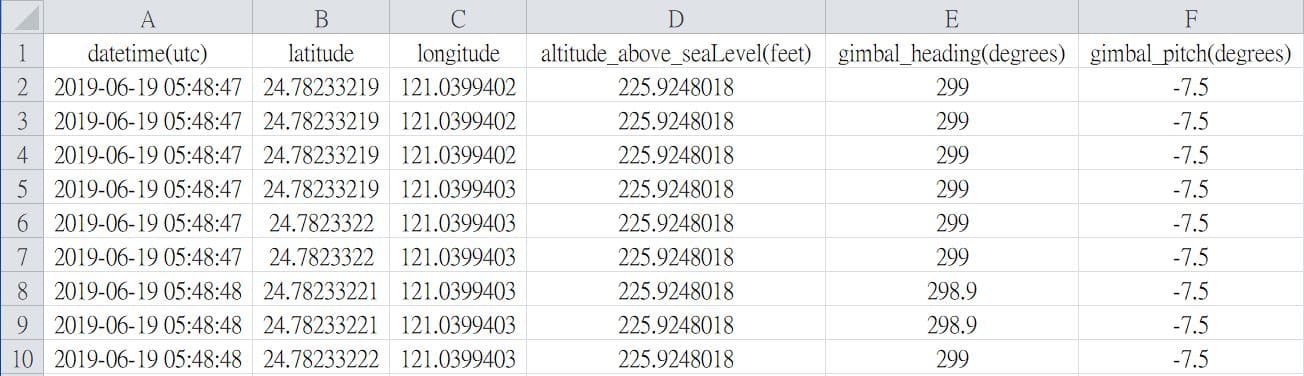 * Csv file can be generated via AirData
(requires FlightRecord_xxx.txt)
Field names must be the same
* Csv file can be generated via AirData
(requires FlightRecord_xxx.txt)
Field names must be the same
    - datetime(utc)
        * y-m-d h:i:s
    - latitude
    - longitude
    - altitude(feet) or altitude_above_seaLevel(feet)
        * Elevation (Above Sea Level)
    - gimbal_heading(degrees)
    - gimbal_pitch(degrees)
My Files
-
Layers - File Upload Considerations
The supported file formats are:shapefile, .tif, .tiff, .gif, .jpg, .png, .kml, .czml and .geojson.
* shapefile(mandatory files):.shp, .shx and .dbf
* shapefile(optional files):.prj, .sbn, .sbx, .fbn, .fbx, .ain, .aih, .ixs, .mxs, .atx, .shp.xml, .cpg and .qix
* notice:all the files in a shapefile must have the same name and upload at the same time. -
3D model
earthbook supports the following three types of 3D models:
Wavefont OBJWavefont OBJ is a 3D model file format. Due to its open file format and simple structure, it is currently widely used by 3D applications.
Example ZIP Structure:
When uploading the model, please compress .obj, .mtl (material description file) and material image in a ZIP file and upload.
Note: Please name all files in the ZIP file in English to avoid garbled characters
    uploaded_model.zip
        - model.obj
        - model.mtl
        - textures/
            - tex01.jpg
            - tex02.jpg
Wrong ZIP Structure:uploaded_model.zip - model/ - model.obj - model.mtl - textures/ - tex01.jpg - tex02.jpgSample file downloadAltizure ModelAltizure provides high-quality online 3D reconstruction services. Users upload image files and generate model files after reconstruction (OBJ files are packaged in ZIP format) for users to download.
Example ZIP Structure:
earthbook supports loading model files produced by Altizure. Before uploading, please make sure that the parameter file config.json and all model files are located in the root directory of the ZIP archive.uploaded_model.zip - config.json - tile_0_0_0_tex.mtl - tile_0_0_0_tex.obj - tile_0_0_0_tex_tex0.jpg - tile_1_0_0_tex.obj ...Wrong ZIP Structure:uploaded_model.zip - model/ - config.json - tile_0_0_0_tex.mtl - tile_0_0_0_tex.obj - tile_0_0_0_tex_tex0.jpg - tile_1_0_0_tex.obj ...Sample file downloadCesium 3D Tiles3D Tiles is an open 3D model file standard, which is developed and maintained by the Cesium team. 3D Tiles have good streaming efficiency in network applications and are suitable as model files in network applications.
Example ZIP Structure:
When uploading, please package the 3D Tiles file as a ZIP. By default, the system will find tileset.json in the root directory as the model starting file.uploaded_model.zip - tileset.json - part_1.b3dm - part_2.b3dm - part_3.b3dm ...Wrong ZIP Structure:uploaded_model.zip - model/ - tileset.json - part_1.b3dm - part_2.b3dm - part_3.b3dm ...Sample file download
Purchasing
-
How do I purchase storage and premium features?
The online purchase function is not yet open.
If you want to upgrade the space or add features, please send a letter or call us:
Email: service@earthbook.xyz
Phone 03-6578062, Fax 03-6577225
We will contact you as soon as possible regarding your purchase. Thank you.
QGIS Plugin
-
How to install?
You can run the installation file directly or install it through a URL.